

Hello DAX DEV,
Before going to the trick I’ll explain a little bit about Overlaying and extensions on Ax Objects:
Intro About Extensions:
One of the great feature added to Microsoft Dynamics 365 is the concept of Overlaying and Extensions, available for most objects, like tables, forms, data types, menu items, queries and so forth.
To guarantee the integrity of the original code from Microsoft many AX objects can now have their behavior or properties overwritten by this new set of elements instead of manipulating the actual Sys Code.
It is still possible to customize original objects, but this is not a best practice, so much so that most D365 Development Administrators have disabled this possibility on DAX DEV servers, to force developers to manipulate Sys Objects only by extensions and overlaying.
Tables extensions are very useful to create structural changes, like altering field dataTypes, Labels, adding new fields, creating relationships, indexes, events interceptions and so on, but you cannot create or alter table methods on a table extension, so when this is required, the limitation presents a problem.
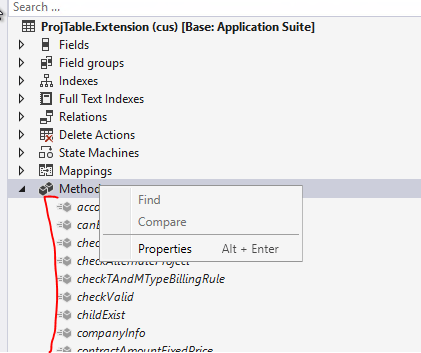
The solution consists on creating a new Static Class, that will work as source code for your Sys Table and here’s an example of a display method for table ProjBudget that will be used later on ProjBudget Form [Extension].
SOLUTION
THERE'S A NEW AND BETTER WAY OF DOING THIS. CHECK NOW ON AXAPTAHUT
 Augmented classes on Tables [ExtensionOf]
- First, you need to create a new Static class that will act as the extended source code for the table using the naming pattern TableName_Extension (trick: you can add project suffixes to the class name but it is important that the class be static)
- Then add a public static display method receiving the table as a parameter.
- This file contains hidden or bidirectional Unicode text that may be interpreted or compiled differently than what appears below. To review, open the file in an editor that reveals hidden Unicode characters. Learn more about bidirectional Unicode characters
static class ProjTable_Extension { [SysClientCacheDataMethodAttribute(true)] public static display DirMemo projValGroupId(ProjTable _projTable) { DirMemo ret; container conGroupId; ProjValProjCategorySetUp projValCategorySetup; while select GroupId from projValCategorySetup where projValCategorySetup.ProjId == _projTable.ProjId { conGroupId += projValCategorySetup.GroupId; } ret = con2Str(conGroupId,","); return ret; } }
- Then, on the Form or Form extension, that has that table, you’ll add the display method in a slightly different manner than usual. After creating field control where it necessary, you should set the correct “Data Source” property and here’s another trick, you should input an expression to the Data Method property mentioning the static class and the static display method you’ve created
- Data Method Pattern: TableName_Extension::DisplayMethodName
- Here’s the example:
- DataSource: ProjTable
- DataMethod: ProjTable_Extension::projValGroupId
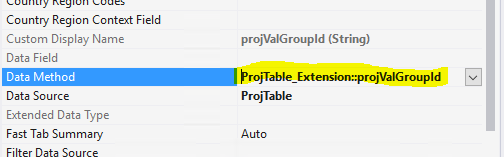
After performing those steps, your display method should work without any issues.
Hope it might be helpful,
Follow us and get exclusive AX DEV content weekly
Thanks,
Felipe Nogueira
 AXAPTA Hut
[…] THERE’S A NEW AND BETTER WAY OF DOING THIS. CHECK NOW ON AXAPTAHUT […]
Augmented classes [ExtensionOf] on Tables